
Monday 9:00 AM - 5:00 PM · Room 440-442, 4th Floor
Power Apps 101 - From Curious to Expert
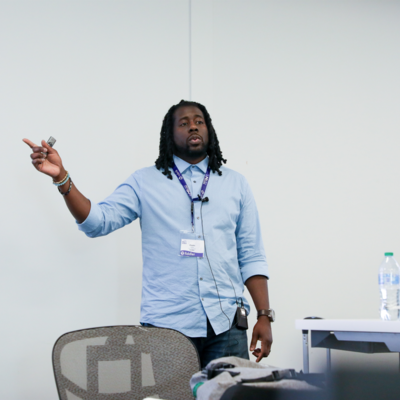
Charles Lakes II
Microsoft MVP BizApps | Creative Solution Architect @ The II Lakes Group
Build Real Business Apps in a Day – No Prior Experience Needed
Join us for a full-day, immersive workshop designed to take you from Power Apps beginner to confident app maker, ready to build real-world business solutions. Whether you're just curious about low-code or looking to fast-track your journey into app development, this workshop is your launchpad.
In this hands-on experience, you'll learn:
✅ Power Apps fundamentals – controls, variables, data sources ✅ Best practices in UI design and performance ✅ How to connect to SharePoint, Dataverse, Excel, and more ✅ Working with forms, galleries, and collections ✅ Implementing logic, validation, and business rules ✅ Creating responsive designs that work on mobile and desktop ✅ Publishing and sharing your first business-ready app
By the end of the day, you’ll walk away with a fully functional, professional-grade Power App tailored to solve a real business scenario — and the skills to keep building.
This workshop is perfect for:
New Power Platform users Citizen developers and business analysts IT professionals exploring low-code Anyone ready to transform manual processes into digital apps No prior coding experience required — just bring your curiosity, and we’ll provide the rest.
Tuesday 9:00 AM - 5:00 PM · Room 440-442, 4th Floor
Discover Power Apps and Power Automate: A Quick Start for Copilot-Enabled M365 Makers

Scott Shearer
Microsoft 365 Evangelist, MVP and MCT

Wes Preston
Founder and independent consultant working with platform alignment and no-code solutions with M365 and Power Apps
Are you new to Power Apps and Power Automate? Join this hands-on session designed to help makers expand their Microsoft 365 toolkit, with Copilot guidance along the way.
You’ll tackle a real-world business scenario, using a Copilot-first approach to go from initial requirements towards a full-featured solution—building on a M365 foundation with Power Apps and Power Automate. Throughout the session, you’ll see how Copilot features can streamline app and flow creation, making the process more intuitive and efficient.
Expect a practical, step-by-step walkthrough for creating Power Apps and Flows. By the end, you’ll have a solid grasp of both technologies and how Copilot can accelerate your development journey.
Notes and Requirements: Attendees must come prepared with: A laptop computer (Attendees who bring tablets with keyboards will likely have a sub-optimal experience) A Microsoft 365 (M365) environment where you can create a Team, lists, Power Apps, and Power Automate Flows. A separate Copilot license is not required. If you do not have an M365 environment in which you can work, please consider "purchasing" a Microsoft 365 Business Basic plan currently priced at $6 per month with a 30-day free trial. The subscription can be cancelled within the first 30 days. If you are using a company owned laptop, please verify that you can create Power Apps, Power Automate Flows, a Team as well as other M365 components. Employers frequently lock down laptops.
Wednesday 8:30 AM - 9:40 AM · Ballroom 2, 5th Floor
Keynote : Building What’s Next for Work

Jason Moore
Vice President of Product Management – Copilot Studios
You’ve been using and building with AI. Now let’s talk about what’s actually possible at scale. In the opening keynote, Microsoft CVP Jason Moore takes a hands-on look at how business users, AI leaders and makers are rewriting the rules of work — improving personal productivity, transforming business systems, and orchestrating complex processes across people, applications, data, and agents. The Microsoft 365 community has always led in delivering value from productivity tools, and with AI now woven into every layer of the stack, what you can build and how fast you can build it has changed fundamentally. Live demos and real customer stories bring it all to life: how Microsoft 365 Copilot, Copilot Cowork, Power Platform, and Copilot Studio come together to put serious capability in the hands of makers at every level. And because none of it matters without trust, you’ll also see how governance keeps it all running at enterprise scale. If you’re building with AI and wondering how far it can go, this is where you find out.
Wednesday 10:20 AM - 11:30 AM · Room 440-442, 4th Floor
Power Apps Quick-Start for Copilot-enabled M365 Makers
Wes Preston
Founder and independent consultant working with platform alignment and no-code solutions with M365 and Power Apps
Unlock the potential of Microsoft Lists with Power Apps and Copilot. Join us for a session designed for power users and makers who are already harnessing the power of Microsoft Lists. We’ll extend List data with the functionality of dynamic forms and functionality using Power Apps and Copilot. In this session, you will get past your fear of complexity and learn how to: • Integrate Power Apps with Microsoft Lists to enhance data management and user experience. • Build custom forms and applications that leverage the data stored in your lists. • Explore real-world examples and best practices to inspire your own innovative solutions. Whether you're looking to improve your existing approaches or develop new applications, this session will provide you with the knowledge and tools to unlock the full potential of Microsoft Lists with Power Apps. Don't miss this opportunity to elevate your skills and transform your business solutions!
Thursday 11:40 AM - 12:50 PM · Room 440-442, 4th Floor
The New Copilot Studio: A Whole New Way to Build

Andrew Hess
Youtuber | AI Lead | Application Developer | Speaker
The New Copilot Studio represents a whole new way to build, and it's more powerful than ever! Join Andrew Hess from the Microsoft CAT Team walk through the brand-new Orchestrator, Front End, and Experience. We'll look at what's changed and why it matters, including expanded capabilities for working with document content as part of building and grounding your agents. You'll see how the new experience helps you create more capable agents and get more out of the content your organization already has.
Thursday 11:40 AM - 12:50 PM · Room 443-444, 4th Floor
Do More in Microsoft Teams with Power Apps and Power Automate

Karinne Bessette
Technologist, PS @Veeam
In today's industry, custom settings and applications are not only in high demand but have become standard practice. To achieve this, the administrator must be capable of building new tools, automating processes, and making it easy for end users to access. This used to be a daunting task that generally meant outsourcing projects, hiring development or hanging a "do not disturb" sign on the already overworked admins' door and hoping for the best months... or years later. Luckily this process has gotten much easier with tools that offer "code-less" or what I like to call nearly code-less automation. This empowers admins to develop tools and automation in minutes and hours, which would have previously taken weeks or longer. And there is very little need to understand deep code. In this session, we will take a look at Power Apps, Adaptive Cards, and Power Automate features that can be leveraged in Microsoft Teams with in Minutes. And yes, there will be live demos to show how easy this can be.
Friday 9:00 AM - 10:10 AM · Room 440-442, 4th Floor
Power Apps: Business Solutions for the Modern Enterprise
Charles Lakes II
Microsoft MVP BizApps | Creative Solution Architect @ The II Lakes Group
Low-code is holding its own against, if not edging out pro-code and no-code development for today's modern, scalable, enterprise solutions. Power Apps, Microsoft's SaaS offering to design and build highly custom business apps, is a suite of services and connectors promoting rapid, feature-rich app development.
In this session, we’ll explore how Power Apps (I) empowers non-devs, (II) welcomes pro-devs, (III) reduces infrastructure costs, (IV) tackles IT's project backlog, (V) drives process innovation, and (VI) democratizes business solution development.